
Installing with Dynamic Config
Inject Coolify Tweaks through Traefik's rewrite-body middleware.
Introduction
Dynamic Config lets Traefik rewrite HTML responses so Coolify Tweaks loads without a browser extension. Once configured, every browser, device, and automation hitting your dashboard will get the theme automatically.
Prerequisites
- Coolify already running with Traefik (
/data/coolify/proxy/docker-compose.yml) - You have access to
/data/coolify/proxy/
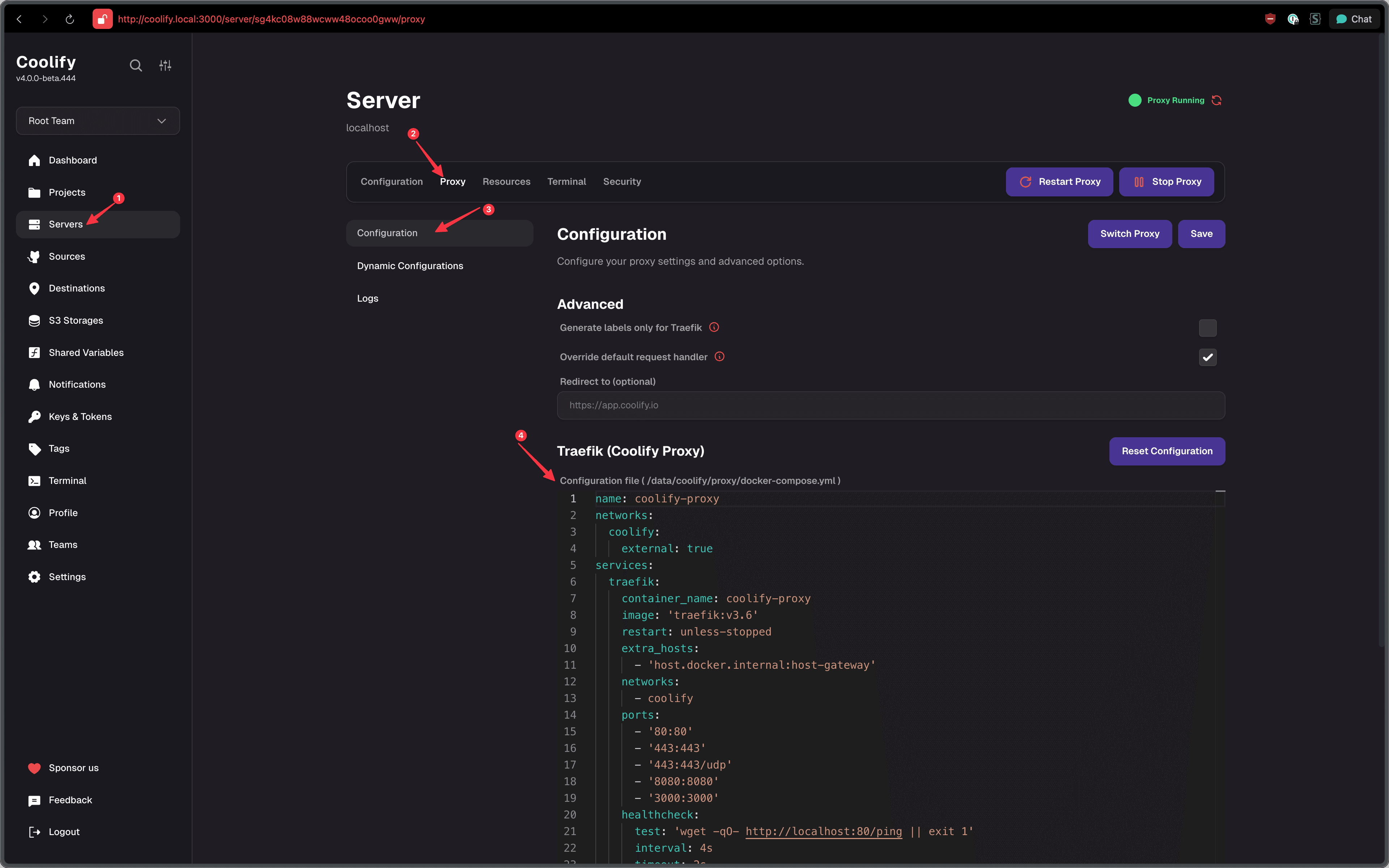
Note: Although this guide refers to /data/coolify/proxy/ as a terminal guide, you can also do this through the web interface by going to Servers → localhost → Proxy → Dynamic Config, and Proxy Configuration.
Automatic Installation
Run the installer if you want everything applied automatically (backs up .env and docker-compose.yml, updates APP_PORT, writes the dynamic config, and restarts Coolify + Traefik):
curl -fsSL https://coolify-tweaks.techwithanirudh.com/scripts/install/dynamic-config.sh -o dynamic-config.sh
sudo bash dynamic-config.sh
The steps below show how to do the same changes manually.
Manual Installation
Update .env
Edit /data/coolify/source/.env and set Coolify's dashboard port to 3000 so the dashboard stays reachable even if Traefik is down:
APP_PORT=3000APP_PORT must be a plain port number. Coolify's compose also uses it in
expose:, which rejects a bind address, so a value like 0.0.0.0:3000 makes
the restart fail with strconv.ParseUint: parsing "0.0.0.0:3000": invalid syntax.
Update Traefik Compose
Edit /data/coolify/proxy/docker-compose.yml.
Inside the existing traefik service, add these lines. Don't delete anything already there.
services:
  traefik:
    # ...your existing keys
    ports:
      # existing ports
      - "80:80"
      - "443:443"
      - "8080:8080"
      # ✅ port for the Coolify dashboard entrypoint
      - "8000:8000"
    command:
      # keep your existing flags, then add:
      - "--experimental.plugins.rewritebody.modulename=github.com/traefik/plugin-rewritebody"
      - "--experimental.plugins.rewritebody.version=v0.3.1"
      - "--entrypoints.coolify_dashboard.address=:8000"
Save and close.
Create Dynamic Config
Create a new file:
/data/coolify/proxy/dynamic/coolify-tweaks.yml
http:
  middlewares:
    rb-buffer:
      buffering:
        maxRequestBodyBytes: 0
        maxResponseBodyBytes: 0
        memResponseBodyBytes: 0
    rb-force-identity:
      headers:
        customRequestHeaders:
          Accept-Encoding: identity
    rb-inject-css:
      plugin:
        rewritebody:
          lastModified: true
          rewrites:
            - regex: "(?is)</head>"
              replacement: '<link rel="stylesheet" href="https://coolify-tweaks-api.techwithanirudh.com/release/latest/?asset=main.css" referrerpolicy="no-referrer" crossorigin="anonymous"></head>'
          monitoring:
            methods: [GET]
            types: ["text/html"]
    coolify-tweaks:
      chain:
        middlewares:
          - rb-buffer
          - rb-force-identity
          - rb-inject-css
  services:
    coolify:
      loadBalancer:
        servers:
          - url: "http://coolify:8080"
Add Routers
Option A: Local Dashboard (no custom domain)
If you just access Coolify internally or via IP:
http:
  routers:
    coolify-dashboard:
      entryPoints: [coolify_dashboard]
      rule: PathPrefix(`/`)
      service: coolify
      middlewares: [coolify-tweaks]
      priority: 1000
This serves your modified dashboard on http://<host>:8000.
Option B: Custom Domain
If you use a public domain, add this in addition to the router above:
Replace yourdomain.com with your public domain.
http:
  routers:
    # HTTPS injector for your domain
    coolify-https-inject:
      entryPoints: [https]
      rule: "Host(`coolify.yourdomain.com`) && !PathPrefix(`/app`) && !PathPrefix(`/terminal/ws`)"
      service: coolify
      middlewares: [coolify-tweaks]
      tls:
        certResolver: letsencrypt
      priority: 2000
Restart Coolify and Traefik
From /data/coolify/source, restart Coolify to pick up the new APP_PORT:
docker compose \
  --env-file .env \
  -f docker-compose.yml \
  -f docker-compose.prod.yml \
  up -d --remove-orphans --force-recreate --wait --wait-timeout 60
If you have a docker-compose.custom.yml, include it with -f docker-compose.custom.yml like the installer does.
Restart Traefik
Restart Traefik from /data/coolify/proxy:
docker compose \
  -f docker-compose.yml \
  up -d --force-recreate --wait --wait-timeout 60
Verify
Visit either:
http://<host>:8000https://coolify.yourdomain.com
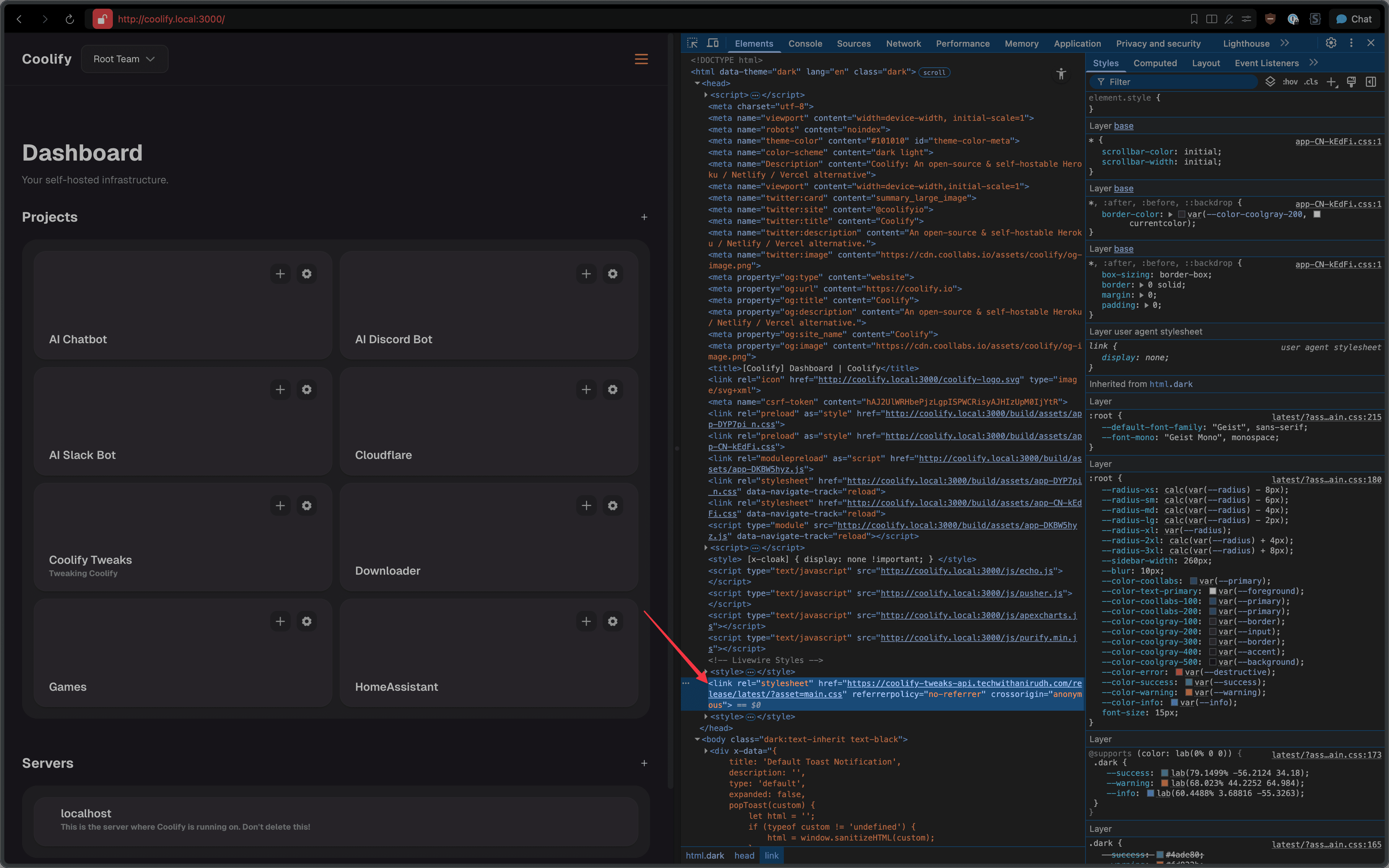
Then check page source for your injected link:
<link
  rel="stylesheet"
  href="https://coolify-tweaks-api.techwithanirudh.com/release/latest/?asset=main.css"
/>
Custom themes
If you want every visitor to enjoy a specific palette, update the injected URL to include ?theme=THEME_ID (matching the ID you copied from TweakCN) and point at the main.css asset:
https://coolify-tweaks-api.techwithanirudh.com/release/latest/?theme=THEME_ID&asset=main.cssChange the <link> tag in the dynamic config to reflect the themed URL so Traefik serves the correct stylesheet.
More information about custom themes can be found in the Theming section.
Rollback
To revert:
- Delete
/data/coolify/proxy/dynamic/coolify-tweaks.yml - Reset
APP_PORTin/data/coolify/source/.envto your previous value (default Coolify uses8000). - Remove:
ports:
  - "80:80"
  - "443:443"
  - "8080:8080"
  - "8000:8000"
command:
  - "--experimental.plugins.rewritebody.modulename=github.com/traefik/plugin-rewritebody"
  - "--experimental.plugins.rewritebody.version=v0.3.1"
- "--entrypoints.coolify_dashboard.address=:8000"- Restart Coolify and Traefik
Troubleshooting
- 404 on
:8000: Ensure the routercoolify-dashboardexists and port8000:8000is mapped. - Plugin not loading: Check Traefik logs for
rewrite-bodyinitialization errors and ensure the plugin version matchesv0.3.1.
Last updated on